Using Kaji in Mattermost
Kaji integrates directly with Mattermost, letting you work with AI without leaving your team chat. You can ask Kaji to answer questions, run tasks, pull data, create content, and more — all from within a conversation thread.
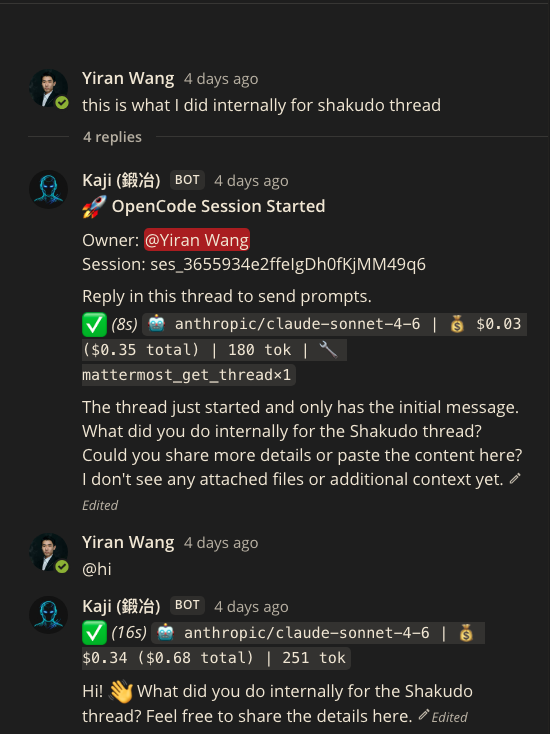
Starting a Kaji session
In any thread
Simply reply to any thread with @kaji followed by your request:
@kaji summarize the key points from this thread
Kaji will confirm the session has started:
🚀 OpenCode Session Started
Owner: @you
Session: ses_xxxxx

Reply in this thread to send prompts.
Session ownership
When you start a session, you become the session owner. By default, only you can send prompts to that session. When starting, you can also choose to:
- Allow one-time access — the next person who replies can also send a prompt
- Allow open access — anyone in the thread can send prompts
Sending prompts
After the session starts, just reply in the same thread with your requests. Each reply is sent as a new prompt to Kaji.
Example prompts
Can you pull the last 7 days of sales data from Dremio?
Create a ClickUp task for the product team: "Review Q1 metrics" due next Friday
Summarize this Mattermost thread and post the summary back here
Update the Notion page "2026 Roadmap" to add this feature under Q2
Understanding Kaji's responses
Each response includes metadata about the operation:
✅ (8s) anthropic/claude-sonnet-4-6 | 💰 $0.03 ($0.35 total) | 180 tok
| Field | Meaning |
|---|---|
| ✅ / ❌ | Whether the task succeeded |
(8s) | Time taken |
| Model | The AI model used |
$0.03 | Cost of this response |
$0.35 total | Running session total |
180 tok | Tokens used |
Tips for getting good results
- Be specific: "Pull revenue by product for January 2026 from Dremio" works better than "get sales data"
- One task at a time: Kaji handles sequential tasks well when broken into steps
- Use follow-ups: You can refine or expand on Kaji's response by replying again
- Mention the tool: If you want Kaji to use a specific integration, name it (e.g., "in ClickUp", "on Notion")
Scheduling recurring prompts
You can schedule Kaji to run a prompt automatically on a cron schedule in any thread. This is useful for recurring reports, daily summaries, or monitoring tasks.
See the scheduling documentation for details.